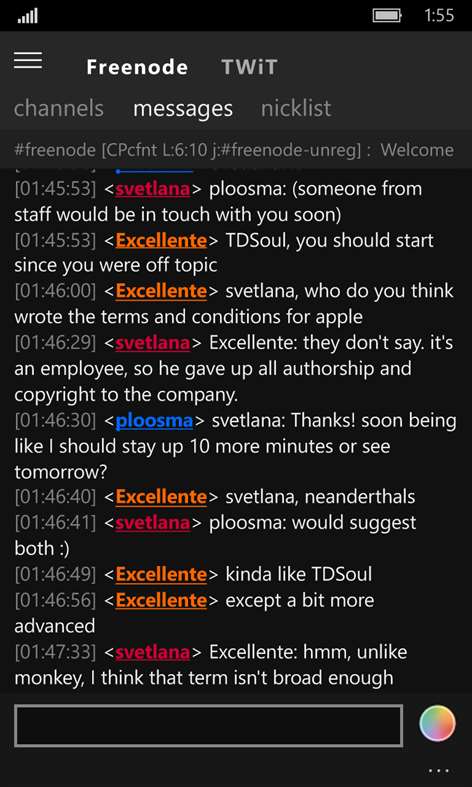
Screenshots

Description

Foo IRC is a full-featured IRC client, the first client released for the Windows Store. Foo IRC provides a tablet friendly, simple interface with plenty of features and options for customizability in a tiny package. Supports IRC natively or via IRCCloud. Provide us your Feedback at: http://fooirc.com/#!support.md

Available on

Xbox One

Xbox One

Windows Holographic

Windows Holographic

PC

PC

Mobile device

Mobile device

Version notes

Version number: Varies by device

New in v3.5.2: Fix for issues that occur when the current user is an registered operator. Fix for nickname changes showing in all joined channels. New in v3.5.1: [Desktop] Debugger fixes and enhancements. [Desktop] Fix for Auto Action Debugger not opening. Auto Action fixes and enhancements. Fix for addins and scripts being unable to read saved custom settings. New in v3.5.0: Added a debugger for Auto Action scripts. Improved speed and recognition of keyboard shortcuts. Fix for auto-suggestions not showing on channels. New in v3.4.3: Current nickname/ident is now shown in the info bar above messages in the server console view. Fix for auto-completing text when inputted using IME. Fix for DCC Chat. New in v3.4.2: Reset the 'Use OS Safe Window Size' settings which caused problems with viewing the full client window for Mobile users of previous versions of Foo IRC. Added option to disable Auto Suggestion. Turned Playback Channel/Private Messages on by default for new users.

Features

  • DCC Chat and DCC Send
  • mIRC text formatting codes support
  • Save servers and channels
  • Perform commands based on Rules
  • Powerful scripting support (Auto Actions)
  • Auto-run commands
  • Custom backgrounds
  • Inline images and video
  • Color coded nicknames
  • Logging
  • Aliases
  • IRCCloud support
  • Pin servers to the Start Screen
  • Command auto-complete
  • Connect using SSL
  • Type history
  • Addins
  • Notify list
  • Auto-connect on client start-up
  • Ignore list

System Requirements

These apply only to PC and phones.
Minimum
OS Windows 10, Windows 8.1, Windows 10 Mobile, Windows Phone 8.1
Architecture ARM, x86, x64
Recommended
OS Windows 10, Windows 8.1, Windows 10 Mobile, Windows Phone 8.1
Architecture ARM, x86, x64

Additional info

Published by
Synfron
Copyright © 2017, Synfron


Approximate download size
571.19 KB - 36.08 MB


Category
Social


  • Age rating
  • Entertainment Software Rating Board

    Teen

    Users Interact


This app can
Use your microphone
Access your Internet connection
Access your Internet connection and act as a server.
Access your home or work networks


Installation
Get this app while signed in to your Microsoft account and install on up to ten Windows 10 devices.


Language supported
English (United States)


Publisher Info
Publisher Website
Publisher Support


Ratings and reviews

Filter by:

To rate and review, sign in.

Sign in

Rating:5/5

5/16/2017

Ben

Platform: PC

Great Universal Windows app

Not only does Foo IRC work well, but it has tons of customization options and power tools galore. It also works great on both Windows 10 and Windows 10 Mobile, including settings sync. The developer also pushes updates pretty regularly, which is always great to see, especially on W10M.

One person found this helpful.

Rating:4/5

4/8/2017

Samuel

Platform: PC

Nice app, syncs with irccloud

I have enjoyed this app for quite a while, but with the most recent update it seems to stop processing when the screen is locked, resulting in idle disconnection. Might be a good idea for some users, but please make it a setting so we can keep a full time connection when we want to.

Rating:5/5

5/19/2017

Alyssa

Platform: PC

Best IRC app on the Windows Store.

Fantastic, really. Developer is also fantastic with keeping up the updates.

Rating:3/5

4/15/2017

Wesley

Platform: Mobile

The app works fine, but if someone sends me a private message and uses the /me command, it puts their line up with my name instead of their name. Kind of confusing, but otherwise, no real problems that I'd noticed.

Rating:5/5

2/11/2017

Thomas

Platform: PC

Really nice work

I've been on the lookout for a good IRC app that's not console related and this fits the bill perfectly. Nice feature set and easy to use. Great job devs!

Rating:4/5

10/28/2016

CW

Platform: Mobile

Only needs one thing.

This is a great irc program for Windows 10 M and works fine on desktop. However it still needs a notify list. I like keeping track of nicks I know. Please add one during am update.

Developer comment · Synfron responded on 1/14/2017

Thank you for the review. A notify list feature has been added to the latest update, v3.4.0.

One person found this helpful.

Rating:5/5

9/13/2016

Martin

Platform: PC

Excellent IRC app

This app does just about everything I'd like it to, and in a simple, clean way. The developer has also been very quick to fix issues with Twitch chat. It all seems to be working great now. Thanks for providing good, friendly support!

Rating:5/5

7/15/2016

Lucas

Platform: PC

Great IRC app

Nice, clean, customizable UI & great integration with the Windows 10 notification center. Very functional, as well.

Rating:4/5

6/12/2016

Ricardo

Platform: Mobile

pretty good overall

My favorite IRC app on WP so far. Lets me connect to my network-provided bouncer, so that's pretty cool. I just wish it wouldn't send messages when I hit Enter and the textbox is empty.

2 out of 2 people found this helpful.

Rating:4/5

4/5/2016

Nate

Platform: PC

SSL Fix is great, but the dark theme is hard to read

The default colors for the dark theme make it basically unusable, meaning one of the nicer features this app has (multiple colors) is not really functional. Other apps manage to strike a balance. More readable default settings would go a long way toward making this app a daily driver.

One person found this helpful.

Rating:/5

Platform:

Developer comment · responded on