Description
Slide Anything allows you to create a carousel/slider where the content for each slide can be anything you want – images, text, HTML, and even shortcodes. This plugin uses the Owl Carousel 2 jQuery plugin, and lets you create beautiful, touch enabled, responsive carousels and sliders.
NOTE: UPGRADING TO VERSION 2.0!!!
After upgrading to Slide Anything version 2.0, if you are experiencing issues with your existing sliders, please RE-SAVE your existing sliders – by editing each existing SA slider and then clicking the ‘Update’ button. Also, if you site is running a CDN CACHE, please ensure you reset/clear this cache.
Slide Anything Version 2
Slide Anything has now been rebuilt using Owl Carousel 2, and this now provides many improvements and new features:
- Infinite Looping – a much requested Owl Carousel 2 feature, which means that the first slide is now seamlessly displayed after the last slide without any carousel rewind.
- New Transition Effects – New Owl Carousel transitions include Slide, Fade, Zoom In, Zoom Out, Flip Out X/Y, Rotate Left/Right, Bounce Out, Roll Out and Slide Down.
- Slide Link Feature – A new feature which allows you to create a hover-over link button for any slide within your carousels.
- Modern Browsers – Owl Carousel 2 Uses hardware acceleration with CSS3 Translate3D transitions. Its fast and works like a charm! Slide Anything has CSS2 fallback built-in to support older browsers.
Slide Anything PRO
SLIDE ANYTHING PRO adds POPUPS into the mix!!
With SLIDE ANYTHING PRO each slide can now open a MODAL POPUP, which can be an IMAGE popup, a VIDEO EMBED popup (YouTube/Vimeo), a popup containing HTML CODE or a popup displaying a WordPress SHORTCODE. This can be a very useful addition to Slide Anything, if you are wanting to create Image or Video galleries for your websites.
For more information about Slide Anything PRO, CLICK HERE.
Owl Carousel
Owl Carousel is an extremely powerful and flexible carousel/slider JQuery plugin, and it is also free to use! Unfortunately, it’s not easy to integrate Owl Carousel into a WordPress site if you are a non-developer, and requires JQuery and PHP coding skills. That is why I developed this plugin.
I use Owl Carousel a in various WordPress sites I develop, specifically where I need the additional flexibility to develop a carousel with a more complex layout, or use a layout not catered for by any existing carousel plugin product.
Owl Carousel has been tested in following browsers/devices: Chrome, Firefox, Opera, IE7/8/10/11, Microsoft Edge, iPhone/iPad/Mac Safari and Android Chrome.
Please view the FAQ Page for information on how to use Slide Anything.
Screenshots

The Create/Edit slider page within the WordPress Dashboard - this is where you define the settings and create the slides for your Slide Anythingslider or carousel.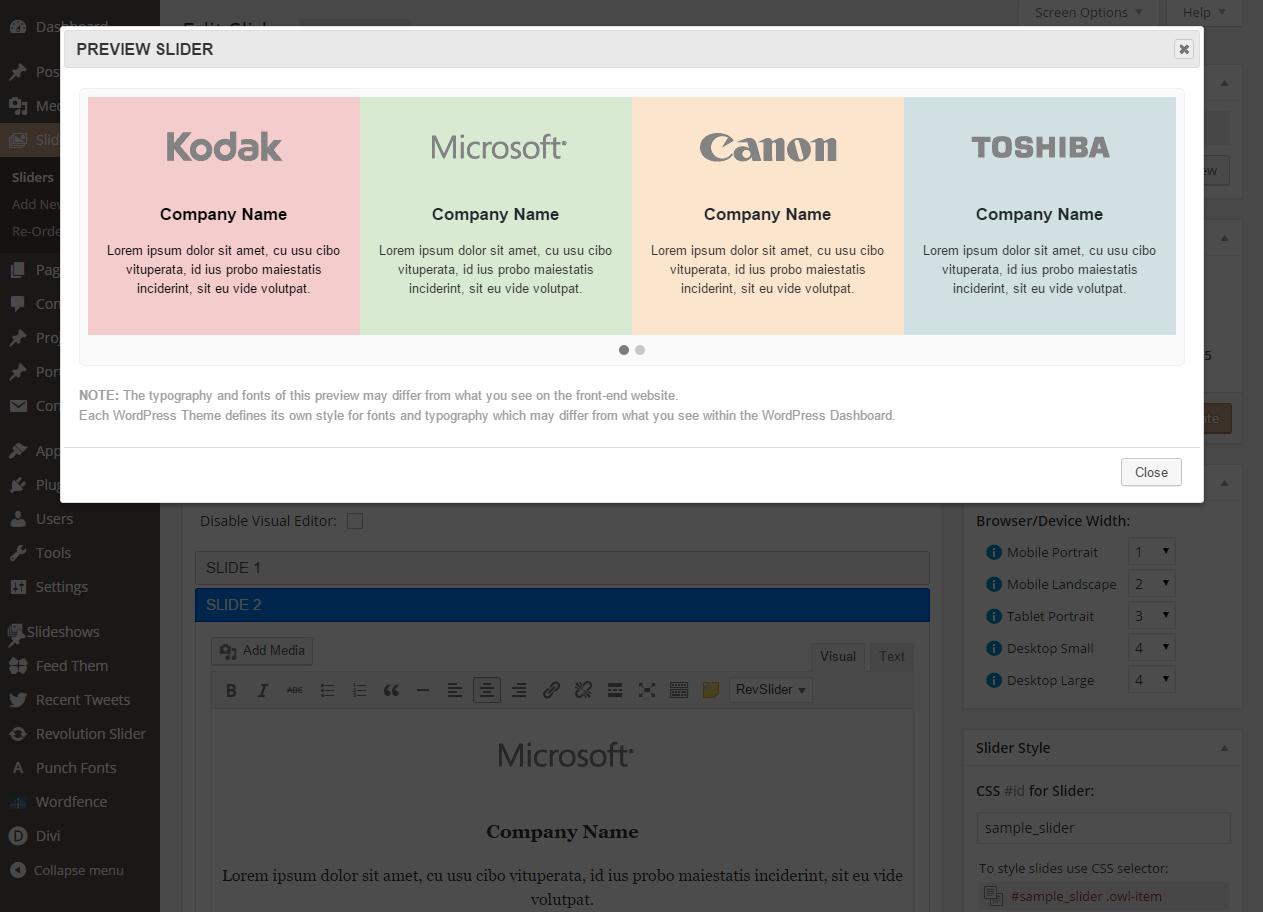
How a carousel created using Slide Anythingappears within the slider preview popup.
Installation
- Upload the entire
slide-anythingfolder to the/wp-content/plugins/directory. - Activate the plugin through the ‘Plugins’ menu within the WordPress Dashboard.
You will now see the Sliders menu in your WordPress admin panel.
FAQ
- Installation Instructions
-
- Upload the entire
slide-anythingfolder to the/wp-content/plugins/directory. - Activate the plugin through the ‘Plugins’ menu within the WordPress Dashboard.
You will now see the
Slidersmenu in your WordPress admin panel. - Upload the entire
- How do I insert `Slide Anything` sliders into my WordPress pages or posts?
-
There are two ways to do this. If you are using the visual editor to edit a page or post, you will see a
Slide Anything Slidersbutton/icon in the toolbar of the editor. Click this button and a popup will be displayed containing a list of sliders that you have created. Select the title of a slider within this list and clickOKto insert the shortcode for the selected slider into your page or post content.The other method: When you are editing your slider within the WordPress Dashboard, you will see a box with the heading
Shortcode / Previewon the right-hand side. Click theCopy to Clipboardbutton within this box to copy the slider shortcode to your clipboard. Paste this copied shortcode into the page or post where you would like your slider to appear. This is also the method to use if you want to insert your slider into a text widget or another custom content type, such as a portfolio post. - The difference between a Slider and a Carousel, and how to create either
-
By definition a
sliderhas a single slide displayed on-page at a time, whilst acarouselhas multiple slides displayed ‘on-page’ at a time. TheItems Displayedbox, on the right-hand side of the slider edit page in the WordPress dashboard controls how many slides are displayed on-page at a time.To define a slider, all the settings within this box must be set to
1. When these are set to values greater than1, a carousel will be displayed, for example you may want to display a carousel with 4 slides visible on desktop devices, 3 slides visible on tablets and only 2 slides visible on mobile phones. - How do I define slide background images?
-
The
Slide Backgroundbox for each slide in your slider allows you to define a background image or a background color for each slide. Note that the content you add to each slide within the slide editor box for each slide is foreground content and sits ontopof the slide background – this content can be other images and textual content.To set a slide background image, click the
Set Imagebutton. TheBackground Sizesetting determines if, and how the background image is stretched/shrunk to cover the slide content area and theBackground Repeatsetting determines if the backgroung image should be repeated, like tiles. TheBackground Colorsetting allows you set a color for the slide background – note that you can have both a slide background color AND a slide background image. The small background preview window to the left of these settings give you an indication on how the settings you choose will look.The
Min Heightsetting (within theSlider Stylebox), is often used in conjunction with defining slide backgrounds, as this setting controls how much of the slide background is visible if the slide contains no (foreground) content. - How do I use the `Slider Style` settings?
-
At the top of this box, which appears on the right-hand side when editing a slider, you can set and copy the CSS
IDfor the slider. This is useful for developers who are familiar with CSS coding, and this CSSIDcan be used to create custom styles for your slider within your theme or child-theme’s style/CSS file.The
Padding (pixels)settings are used to define the amount of padding space around the entire slider – top, right, bottom and left. TheBackground/Bordersettings define the background colour for the entire slider (Note:each slide’s background image/color will appear on top of this slider background), and also if a border should appear around the entire slider – the width, color and border radius of this border.The
SLIDE STYLEsettings are the style settings for each individual slide with the slider/carousel. Here you can define the minimum height each slide and also the padding space around each slide.
Reviews

Powerful and responsive
Very light but powerful slider/carousel.
One can customize anything via slider edit menu and moreover via CSS manually. Even replace default left and right arrows by Font Awesome icons!
Slide Anything helped me to make aditional carousel text menu for my website.
Will recommend this plugin to my coleegues.

Easy to use slider
I needed a simple text slider, this plugin was easy to setup and implement.

Love this carousel slider!
It is very versatile. I was looking into creating my own carousel without going for over-priced ‘GO PRO’ sliders. Thank you! Will donate.

Amazing plugin!
When I saw first saw the plugin I thought it was a premium plugin (paid plugin) because of it’s presentation.
Does exactly for what I need it for, and the customer can easily change their own texts and images! 5/5 guys!

Nice
Really nice plugin! Thank you for that.

GREAT GREAT GREAT ……
Verry great! Thanks man!
Contributors & Developers
“Slide Anything – Responsive Content / HTML Slider and Carousel” is open source software. The following people have contributed to this plugin.
Contributors
Translate “Slide Anything – Responsive Content / HTML Slider and Carousel” into your language.
Interested in development?
Browse the code or subscribe to the development log by RSS.
Changelog
1.0
- Initial release of this plugin.
1.1
- Added a slider preview feature to the slider edit page – pressing the ‘Preview’ button displays the slider within a popup window.
1.2
- Added a button to the visual editor on pages and posts which displays a list of all sliders you have created, allow you to select a slider and the corresponding shortcode is automatically inserted into your page or post.
- Added the ‘Random Order’ checkbox to the edit slider page, and when checked slides will be randomly re-ordered whenever the slider is displayed
- Fixed issue with the ‘delete plugin’ function, which was crashing
1.3
- Added setting to add a margin left and right of each slide
1.4
- Bug Fix: Added
Allow Shortcodessetting. Running shortcodes withinSlide Anythingmay cause issues with some WordPress Page Builders, and disable this setting will resolve this issue if it occurs. - Added a new
Items Displayedsetting to set the number of slides to be displayed on screen resolutions over 1400 pixels - Added a new
Autohide Arrowssetting to enable/displayed the autohide feature for slider navigation arrows
1.5
- Bug Fix: Fixed issue with some HTML elements/attributes being stripped out when certain shortcodes are used within slide content – found an alternative to KSES sanitization for slide content.
- Added a new dropdown option ‘Background Position’ for the slide background of each slide
1.6
- Added
Slide Transitionsetting to set the transition of 1-Items Sliders to a ‘fade’, ‘backSlide’, ‘goDown’ or ‘fadeUp’ transition effect - Added checkboxes to enable/disable
mouseDragandtouchDragcarousel settings - Some small bug fixes
1.6.1
- Bug Fix: Fixed minor issue when editing slide content within the WordPress Dashboard using the Text Editor. If HTML tags are not properly closed, then this was causing an issue – added the WordPress ‘balanceTags()’ function to correct this issue.
1.6.2
- Bug Fix: Fixed minor issue with IE 10 and IE 11 – the ‘fade’ and ‘fade up’ transition effects were not working.
2.0
- Rebuilt Slide Anything using Owl Carousel version 2.
