Subscribe Now!
...with web-based news readers. Click your choice below:


...with other readers:

FeedBurner makes it easy to receive content updates in My Yahoo!, Newsgator, Bloglines, and other news readers.
Learn more about syndication and FeedBurner...
Current Feed Content
-
Introducing the Pocket Instant App for Android
Posted:Thu, 18 May 2017 11:32:33 +0000

At Pocket, we’re always working hard to deliver a stellar experience when reading content on any device. This is why we’re thrilled to introduce the Pocket Instant App for Android. Now, with the simple tap of a link, readers can instantly experience the benefits of Pocket, even if they don’t have the app installed on their phone.
Our Instant App includes two of Pocket’s best features, Article View and Related Recommendations, giving readers a seamless introduction into what can be unlocked by downloading our full app and signing up for a Pocket account.
Here’s how it works:
Normally on Android, tapping links shared from Pocket will open in your mobile browser. Depending on your Internet connection and the size of the article, it can be a long wait for the article to finish loading.

Now, when you open a link shared from Pocket, it will load in our Instant App for Android. The app loads quickly (they don’t call them “instant” for nothing!), and you can turn on Article View for a clean, focused, and distraction-free reading experience. Want to dive deeper? Tap the bottom of your screen to see a few recommendations related to the article that was shared. The best part is, this rich experience is delivered to you without needing to install the full Pocket app.
—
Pocket is one of fifty new Instant Apps you can try out on your Android phone or tablet today. We can’t wait to hear what you think! If you’d like to learn more about Android Instant Apps, you can do so here. Have other questions about how to get started? The Pocket Support Team is here to help! Click here to get in touch.– Team Pocket
-
Introducing the Pocket iMessage app!
Posted:Thu, 09 Mar 2017 18:55:22 +0000

iMessage apps are a fun and useful way to interact with your friends and family without ever leaving the Messages app. Now, with Pocket for iMessage, you can browse and search your saved items in Pocket and seamlessly share them without ever leaving the conversation.
Here’s how it works:
First, open an existing conversation or start a new one and add a recipient. Then, tap the Apps button and select Pocket.
(If you can’t find Pocket, you may need to enable the app first. Just open the iMessage App Store, then open the Manage tab, and enable Pocket. Here’s a helpful article from Apple explaining how this works: Use iMessage Apps on your iPhone, iPad, and iPod touch)
Once you’ve opened Pocket, you can scroll through your recent Pocket activity. Both newly saved items and Archived items will appear here. You can also use the Search box to search your Pocket account to find the article you’d like to share.
Tip: Tap the ⌃ button in the bottom right corner of the app to expand iMessage for easier browsing.
Finally, simply tap the item that you’d like to share, and it’ll be ready to share. The article title and preview image will load automatically in the message box, and you’ll have the option to add a comment or simply send it off!
—-
We hope you enjoy this fun new way to share articles in Pocket with your friends and family! Questions about how to get started? The Pocket Support Team is here to help! Click here to get in touch.
-
Taking Pocket Further with Mozilla
Posted:Mon, 27 Feb 2017 02:03:34 +0000

A letter from Pocket’s founder/CEO to Pocket users.
You may know Pocket as the app. The little button in your browser. The late-night reading companion. The reprieve from the noise. A place to find interesting content.
To us, the team building it, it means a mission that we care deeply about. One that might have begun with the simple goal of saving the articles you wanted to read later, but that today feels more pressing and relevant than ever before.
Pocket’s mission is to create a platform that enables people to save, share, and consume the content worthy of their time and attention. And by doing so, we hope to make it easier to spend time with more high-quality content, no matter how noisy it gets.
In a world where we are buried by content, where it’s become increasingly harder to find signal in the noise, truth from fiction, and even the value of our press and written word is being challenged, we need a platform where high-quality, thoughtful content and free speech can rise above the rest.
What matters most to us is our ability to make a real impact in the lives of our users and the world at large. That’s why we’re excited to announce that we’ve found a powerful new ally in helping us achieve our mission, while building a better, healthier, and more interesting Internet in the process.
As of today, Pocket is joining forces with Mozilla.
Pocket will continue on as a wholly-owned, independent subsidiary of Mozilla Corporation. We’ll be staying in our office, and our name will still be on the wall. Our team isn’t changing and our existing roadmap has been reinforced and is clearer than ever. In fact, we have a few major updates up our sleeves that we are really excited to get into your hands in the coming months.
How does Mozilla fit into this equation? They’re adding fuel to our rocketship. We have worked closely with Mozilla as we partnered with their Firefox team, and established a deep trust with their team and vision. They have extraordinary resources, global scale, and reach to put Pocket in more places, and help us build an even better product, faster.
Together we are going to continue expanding the reach of high-quality content, while staying true to the values that drive both Pocket and Mozilla alike: Protecting the openness of the web and creating a content platform built around trust and privacy.
When I sat down to write the first version of Pocket – which just so happened to be a Firefox add-on – I had no idea where it would lead. Now, as I reflect upon the last 9 and a half years, I struggle to find the words to describe it. What started out as a late-night hack project has since employed over 60 different people throughout its history. People who have spent countless days and nights thinking and working on how to make an amazing product. It’s moved people across countries and over oceans. It’s a button that has been clicked over 3 billion times, enabling trillions of words to be read that may not have been otherwise. It’s been the source of millions of articles and thoughts to be shared, sparking conversations that are important and so very necessary.
But above all else, it has made an impact on you, our users.
As we have continued to grow both as a product and as a company, one thing hasn’t changed: Our passion for building a product we love, and the respect we have for you, our users. We hope that each of you know that we wake up every day thinking about how to make Pocket better for you. And starting today, now under the Mozilla banner, we’ll be doing just the same, for a long time to come.
If you have any questions about the news, we encourage you to reach out to the Pocket Community team – our number one priority is you!
Looking forward to what’s next!
– Nate (Pocket CEO/Founder) and the entire Pocket team -
Making the web a more interesting place
Posted:Wed, 26 Oct 2016 16:30:05 +0000
Breaking news alerts. Medium posts. 42 cat gifs that perfectly describe your life. Everyday, thousands of new stories are published, burying what came before them, and leaving it to you to scroll through the clutter to simply find what is good.
Yet everyday, millions of people on Pocket are saving and reading what’s interesting to them – helping us build an impressive library of over 3 billion saves that surfaces a unique and truly human view of what’s good on the web.
Having this kind of insight empowers us to create experiences that remove the work and stress of finding something interesting to read or watch, so that you can simply focus on the stories that are worthy of both your time and attention.
Today, we are excited to introduce not one, not two, but three new experiences and features that will help you do just that.
Browse, search, and explore the very best of the web
For the first time, we are opening up Pocket’s understanding of what’s good and worthwhile on the Internet, and making it easy for anyone to search and discover the best of the best on any topic. No Pocket account necessary.
Head to Pocket’s new Explore Page and give it a spin for yourself.
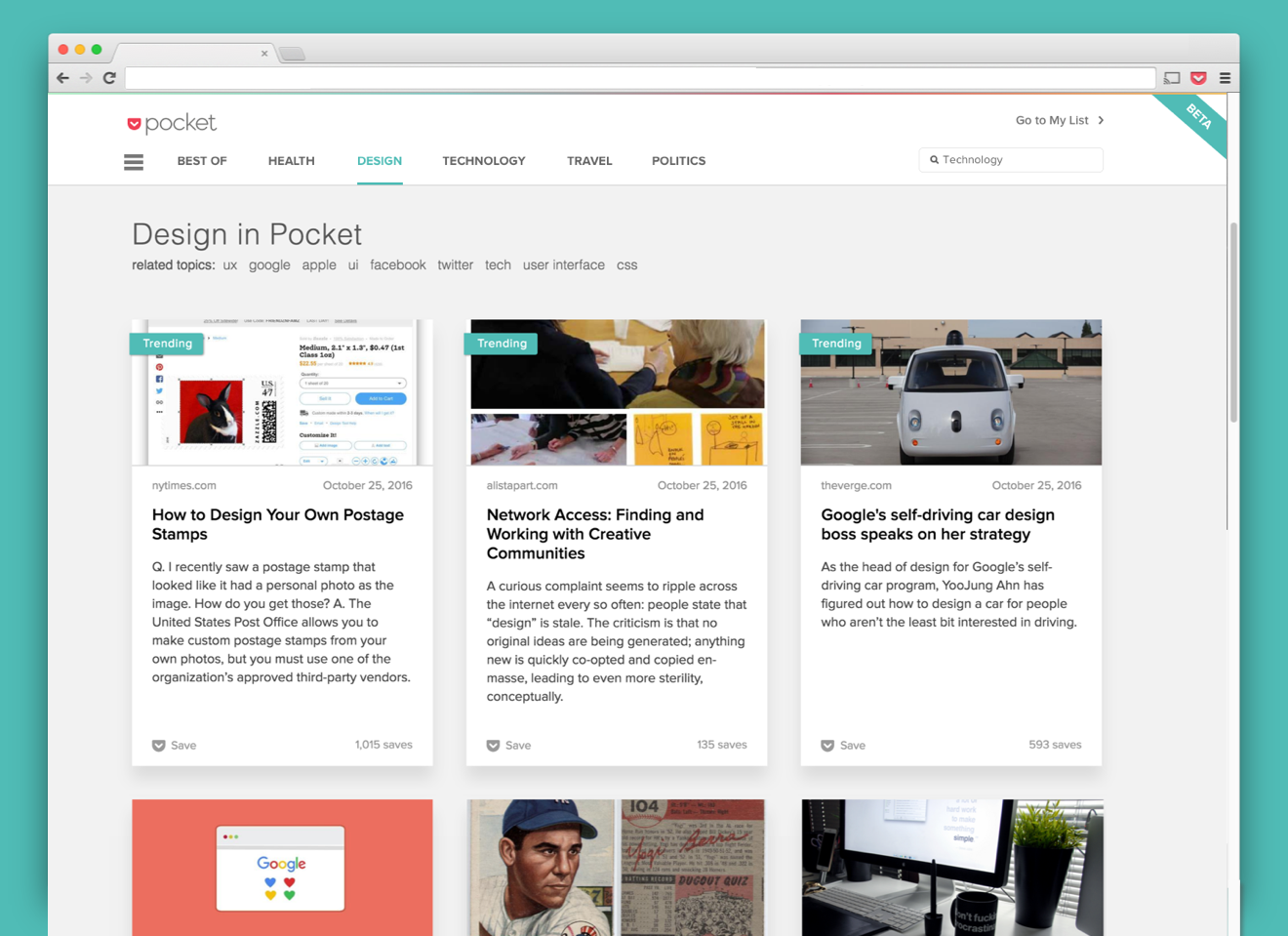
Search for what interests you:
When you first visit Pocket Explore, you’ll be greeted with a question: What interests you?
While Google is great at helping to answer a question, and Pinterest is a great place to search around an idea or thing to do, never before has there been a specific and intentional place to go when you want to satisfy a curiosity or surface the best content around a specific topic you care about.
Today, Pocket becomes that place.
Given the sheer breadth and diversity of what’s saved to Pocket each day, you can now search for just about any subject under the sun. Interested in urban design? Comedy? The latest HBO / Netflix show that’s blowing up? Whatever it may be, the most interesting stories, profiles, videos and deep-dives the web has to offer for that topic are now at your fingertips, hand-selected by the Pocket community.
As you explore, you’ll also notice a set of Related Topics near the top of the page, letting you quickly navigate down a rabbit hole of discovery that’s directly tied to your interests. Hop from Jazz to Duke Ellington to New York and back again.
Browse and explore:
Want a more guided experience? You’ll also find easy paths to see back-issues of Pocket Hits, our beloved newsletter that features the day’s 10 most interesting stories; trending topics like the U.S. Election or World Series; and pages dedicated to popular topics like Technology, Parenting, Travel and Finance.
This is only the beginning:
This is a very early Beta version of what we have to offer, which means there is a lot more to come. Yet even at version 0.1, we’re excited to begin fulfilling the promise of surfacing diverse, eclectic, and high-quality stories and perspectives for an enormous range of topics, making the web an overall better and more interesting place to browse in.
Needless to say, we are so excited to get this in your hands 🙂
—
Bringing the best of the web to all the right places
In addition to Pocket Explore, we are also thrilled to launch two new features coming to our Chrome Extension that will help you discover high-quality and contextual story recommendations at just the right time.
Dive deeper with Related Recommendations:

Come across an article that interests you? Now, when you save it using Pocket’s Chrome Extension, we’ll show you related stories.
Whether you view them now, or save them to Pocket for later, Related Recommendations let you instantly connect with great content on the topics you care about.
Open a new tab to discover 3 must-read stories from Pocket:

Now when you open a new tab on Chrome, you’ll see 3 must-read stories that are worth checking out right now or saving to Pocket for later. They’re curated from the millions of items being saved every day so you know they’re going to be good, and the best part is, you don’t have to do do any digging yourself!
You’ll also see a list of topics trending on the Web at that moment. Open them to see the best and most relevant stories on the big, newsworthy headlines of the day.
Tip: Want to customize your Pocket experience in Chrome? Visit our support article to learn how. Or, don’t yet have the Pocket Chrome Extension? You can install here.
—
We are so excited for you to begin using these new experiences and features from Pocket!
We’re in a unique position to enable everyone to save and consume the content they care about most, and with today’s releases, we hope that we’ve made it easier to cut through the noise and find a better, deeply human, version of the web.
– Team Pocket
-
Now in iOS 10! New ways to find something good to read in Pocket
Posted:Mon, 12 Sep 2016 19:52:34 +0000
Arriving just in time for iOS 10, Pocket 6.4 is officially here! We’re introducing two features: a new Pocket Widget that lets you easily return to your recent saves, and 3D Touch Quick Actions, which bring fun and helpful Pocket actions right to your Home Screen.
Keep reading to learn all about the new features in Pocket 6.4 for iOS 10, available in the App Store today!
Never lose sight of your Recent Saves with the Pocket Widget:

After updating to iOS 10, the new Pocket Widget shows you your 3 most recently saved items on your iPhone or iPad’s Search screen. Just swipe right from your Lock Screen or Home Screen to see all your widgets!
To add the Pocket Widget, scroll to the bottom of your Search screen. You’ll see an “Edit” button you can tap to add new widgets and organize your favorites.
It’s never been so easy to return to the things you’ve saved to Pocket!
Surprise yourself with 3D Touch Quick Actions:

We are absolutely psyched to finally bring 3D Touch Quick Actions to Pocket on your Home Screen. If you’re on an iPhone 6s or newer that supports 3D Touch, press hard on the Pocket app icon to explore the following quick actions:
- Save Copied Link. Quickly save a URL you copied to your clipboard. This is now the fastest way to save stories and links from Facebook – just copy the link and save it to Pocket via 3D Touch!
- Resume Reading or Watching. Didn’t have time to finish that lengthy New Yorker piece? Want to finish watching that inspirational TED Talk on YouTube? Don’t fret, you’ll be able to quickly return to them later with a 3D Touch.
- Recommendations. Looking for something new and interesting to read? Tap Recommendations to explore the absolute best content being saved across Pocket, tailored to your interests and shared by the people you’re following.
- Surprise Me! Don’t want to hunt for something to read? Tap Surprise Me! to open a random item from your List that you haven’t read yet. It’s fun to roll the dice!
If you’re on iOS 10, you’ll also see our new Pocket Widget displaying your most recently saved item above the Quick Actions menu! As a bonus, if you haven’t already added the widget to your Search screen, just tap “Add Widget” to add it in one tap.
—
In addition to the new 3D Touch Quick Actions and Pocket Widget, we’ve made plenty of bug fixes and improvements designed specifically for iOS 10. You might also notice that our app icon has gotten a fresh coat of paint – just look at that new gradient!
As always, we’d love to hear what you think about these recent changes! You can always send us a Tweet or get in touch with Pocket Support.
Get Pocket 6.4 for iPhone and iPad
– Team Pocket
-
Pocket comes to Microsoft Edge in Windows 10 Anniversary Update!
Posted:Tue, 02 Aug 2016 18:10:00 +0000

While Microsoft celebrates their Windows 10 Anniversary Update, we at Pocket have reason to celebrate as well – we’re welcoming a new addition to our family. Starting today, the Pocket extension is now available in Microsoft Edge!
We’re honored to be one of a few launch partners helping to bring extensions to Microsoft Edge, and are thrilled that we can now deliver the same experience in Microsoft Edge that our users have been enjoying in other browsers.
Introducing Pocket for Microsoft Edge:
Pocket for Microsoft Edge lets you quickly save any page you’re viewing in Edge. Find an article, news story, or blog post you’d like to read later? Just click the Pocket button in Edge to save it to your list. Then, when you’re ready, enjoy viewing it in Pocket’s beautiful, easy-to-read layout.
Pocket lets you go beyond Edge’s native reading list so you can view what you save anywhere — from the bus, to your next flight, to simply kicking back and relaxing with a long read at home on your phone or tablet. You can even save videos too!

Tip: If you want to see Pocket in your address bar like the image above, click here to see our installation instructions.
In addition to saving, the Pocket Extension makes it easy to add Tags to items right when you save them. This is handy for organizing recipes, travel guides, and work-related links as you discover and save things throughout your day.
Don’t forget to hover your mouse over the ●●● menu for additional actions, such as removing a page if you saved it by mistake and Archiving a page if you already read it but still want to save it in Pocket for later. You can also Open your Pocket directly from this menu to catch up on the items you’ve already saved.
—
It makes us so happy to bring Pocket to new platforms and meet so many new people. If you use Microsoft Edge, we can’t wait for you install Pocket and hear what you think!
You can install Pocket for Microsoft Edge in the Microsoft Store, after you install the Windows 10 Anniversary Update today!
Team Pocket
-
Saving is faster than ever with the new Pocket Extension for Chrome!
Posted:Wed, 25 May 2016 16:27:18 +0000

Over a billion items are saved to Pocket each year and with millions more being saved each day, we’re always seeking to make the save experience as fast and as useful as possible for you.
Today we are thrilled to bring a new and improved Pocket Extension for Chrome. Some of you may have been lucky enough to see a preview – it now has a streamlined and lightweight facelift, is lightning fast, and introduces the ability to add anything you read directly to your Archive.
We know that Pocket is also used to keep track of things you’ve already read and may want to reference later, so we added Archive to make it easy to save something directly to your Archive without having to do this in Pocket later on.
.png)
We’ve also improved tagging to be faster and smoother. To get to additional actions like Archive, Remove Page, and Open Pocket, just hover over the Menu button (●●●) for easy access.
Stay tuned for more updates here!
We know many of you are using the Pocket Extension for Chrome throughout your day to save the articles and videos you find interesting — we want to know what you think of these new updates! What do you like, what do you dislike? We want to know.
Also, stay tuned for even more updates to come to our Chrome Extension (and our Safari and Firefox extensions) very soon…we’re working on some very exciting things for you!
– Team Pocket
Get the new Pocket Extension for Chrome
-
There’s a lot to ♥️ in your new Recommended feed!
Posted:Thu, 05 May 2016 15:40:58 +0000

A few months ago, we introduced the ability to follow your friends and incredible curators on Pocket to see what they’re recommending. Since then, the Recommended feed has become the place to discover the most interesting stories on the web, hand-curated by your friends and people who have similar interests.
Today, we’re introducing Like and Repost to our iOS and Android apps, letting you engage more with the recommendations made by those you follow on Pocket. Do you want to show your appreciation for a great recommendation? Like it and brighten someone’s day! Do you want to spread the word about a great recommendation that you found in your feed? Repost it for your followers and give the original poster recognition!
Excited about this? We are too! Here’s how to get started:
First off, Pocket is better with friends! Make sure you’re following your friends or some of our suggested curators. You can find them by tapping the Add Friends button. Next, connect your address book, Twitter, and Facebook to see who you know is already on Pocket. Don’t forget to follow a few of our suggested folks as well!

After adding some people to follow, you’ll begin to see their recommendations in your feed, along with the new Like and Repost buttons. Now, you can start giving kudos and reposting awesome recommendations, like this one about the Nets nearly being named the New Jersey Swamp Dragons (yes, this seriously almost happened):

As a bonus, you can also see when someone Likes or Reposts your recommendations as well! They’ll appear in your Notifications tab and sent via push notifications – just head to your Push Notification Settings in Pocket to decide what you’d like to be notified about.
As always, we’d love to hear what you think about these recent changes! You can always send us a Tweet or get in touch with Pocket Support.
With ♥,
Team Pocket
Get Pocket 6.3 for Android
Get Pocket 6.3 for iPhone and iPad
-
Jumpstart Your Workday and Get the Productivity Pack: Over $490 Worth of Premium Services to Award-Winning Apps!
Posted:Tue, 05 Apr 2016 17:00:19 +0000

The Productivity Pack is back! This time, we’re teaming up with Wunderlist, LastPass, Quip, Do, and UberConference to bring you an incredible bundle for making the most out of your workday. Plus, The New York Times is joining us to include a bonus gift.
Subscribing to all of these services separately would cost you over $490 per year, but with the bundle, you can get one year of each for just $69.99!
The Productivity Pack is the essential, modern-day productivity suite, helping you get things done wherever you are:
- Tackle multiple to-do lists with Wunderlist Pro, giving you unlimited access to collaboration features so you can assign tasks to family, friends, and coworkers.
- Use LastPass Premium to generate and keep track of all your passwords, while kicking your security into high gear with multifactor authentication.
- Watch your team and your work come alive with Quip, the place to create, document, discuss and organize the stuff that your team works on.
- Use Do to run productive meetings – you can set and share agendas, take collaborative meeting notes, mark followups and outcomes, share files, and more.
- Fix all the broken aspects of traditional conference calling with UberConference, giving you a simple and painless way to run conferences without the hassle of PIN codes.
- Keep the articles, videos and websites that interest you available at all times with Pocket Premium’s powerful organization, search, and Permanent Library features.
Plus, as a special bonus, The New York Times is including 12 free weeks of All Digital Access to to NYTimes.com and NYTimes mobile apps for new subscribers!
The Productivity Pack is only available through April 22, 2016, so don’t delay on this opportunity to save a ton of money on these great services!
Check Out The Productivity Pack
Here’s to getting the most out your workdays!
– Team Pocket
-
Building Pocket for the Future
Posted:Mon, 22 Feb 2016 21:05:07 +0000
In the last 3 years, over 22 million people have saved more than 2 billion articles and videos to Pocket. They’ve used Pocket to capture the stories that matter to them, to learn and grow in their careers, and to be inspired and entertained. We are humbled by this, and are committed to making Pocket a unique place where you can find, save, and recommend the stories that interest you for many years to come.
We have a strong vision for the future, and one of the biggest keys to seeing it through is to continue to build Pocket as a business. Pocket Premium was the first piece of this, and in the coming weeks, you may see us begin experimenting with a second piece: showing you the occasional sponsored post inside Pocket.
While testing will be slow and small to start, let me emphasize that sponsored content will be:
- High-quality. Pocket is a place for high-quality content and sponsored posts are no exception to this. Our aim is that these posts, and the content within them, will feel natural to your Pocket experience, and will also be things you’re interested in reading and watching to boot.
- Transparent. Sponsored posts will be clearly marked to differentiate them from other items you see in Pocket.
- Dependent on your feedback. As we experiment with sponsored posts, we are hyper-focused on making sure that it’s done with you in mind. Tell us what you like and tell us what you don’t (our doors are always open at support+feedback@getpocket.com) so we can improve sponsored content within Pocket together.
- In your control. If you see a sponsored post you’re not a fan of, you’ll be able to hide it and give us feedback so we can make it better. If you want to remove sponsored content altogether, Pocket Premium lets you support Pocket’s development and gives you access to additional features, such as an ad-free experience.
- Protecting your privacy. Your data is something we protect fiercely, and no sponsor will ever have access to what you save and do inside Pocket.
We continue to grow as both a product and a company, but one thing hasn’t changed: our passion for building something people love, and the respect we have for you, our users. We’re going to be very thoughtful in our approach here, and at the end of the day, we wouldn’t be here without you. Thank you for being part of our journey. We look forward to making Pocket a place for great content for years to come!
If you have more questions, or want to share your feedback with us, please click here to view our FAQ and get in touch.
– Nate + Team Pocket

FeedBurner delivers the world's subscriptions wherever they need to go. Publish a feed for text or podcasting?
You should try FeedBurner today.